Wednesday, July 7, 2010

How to Change Local Area Connection Settings in Windows?

Local Area Connection or Local Area Network is the option which denotes the network adapter or the network card present in the computer. It appears, like all other connection types, in the Network Connections folder. By default, a local area connection is always activated. A local area connection is the only type of connection that is automatically created and activated. If you disconnect your local area connection, the connection is no longer automatically activated. Because your hardware profile remembers this, it accommodates your location-based needs as a mobile user. For example, if you travel to a remote sales office and use a separate hardware profile for that location that does not enable your local area connection, you do not waste time waiting for your network adapter to time out. The adapter does not even try to connect. If your computer has more than one network adapter, a local area connection icon for each adapter is displayed in the Network Connections folder. If changes are made to your network, you can modify the settings of an existing local area connection to reflect those changes. In order to change the settings of local area connection, you need to:
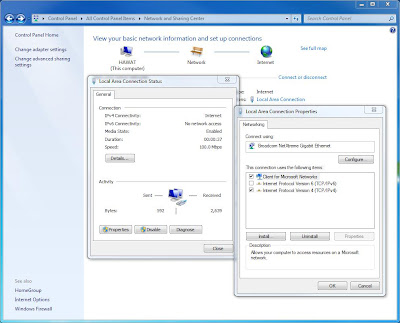
Connection Settings
• Click on “Start”
• Now go to “Control Panel”
• Click on “Network and Internet Connection”
• Click “Network Connection”
• Select the connection whose settings you want to change
• Under “Network Tasks”, click on “Change settings for this connection”
• Local area connection properties dialog box will open up
• From here do the necessary changes by selecting the desired option
• Click “Apply”
• Click on “OK” to save and exit

Tuesday, July 6, 2010

DUAL SCREEN EBOOK LAPTOP – A COMPETITION TO IPADS?

Laptop
Here comes the dual screen ebook laptop – a completely new definition of laptop from Toshiba. A slim and light weight gadget, this can give a stiff competition to iPads. Although it is difficult to predict the magnitude of its success at this point, however it has all the features and characteristics to make it a grand success.

To start with the specifications, this neat piece of slim machine weighs only 819 grams and it is more like an iPad on a Windows platform. It opens vertically like a book and double spread pages on the internet can be read comfortably. It fully capitalizes on the facility of dual monitor, meant for viewing for large and spread out contents. The second screen incorporates the virtual keyboard for the input of data. So a physical keyboard is non-existent. It consists of two 17.8 centimeters dual mutitouch display. The screens have a LED backlight and the processor used is U5400 from Pentium. It has 2 GB of primary memory (RAM) and 62 GB of SSD (solid state drive) as the secondary storage device. It is better than a normal hard-drive because it doesn’t have any moving parts, which are present on the normal hard-drives. It is completely based on semiconductor-based electronics. It is silent and has a lesser access time and latency time. According to Toshiba, a simple sweep of the hand is enough to drag and drop content from one screen to the other. According to Toshiba, you can actually chat face to face with its high speed mobility features.

However, we have to see what sort of configuration is necessary for dual screen monitor viewing on the “display properties” page of the Windows operating system. Is there any display glitch? The time will tell.

Monday, July 5, 2010

Gigabyte GV-N470OC-13I - A review

Joining the family of Nvidia Fermi video cards recently is the GV-N470OC-13L. It started with the GTX480 and then came the 470 series followed by the N470OC-13L.

Following are some of its features:

* It is powered by NVIDIA GeForce GTX 470 GPU 2
* Supports PCI express
* DirectX11
* Open GL 3.2 Support
* 1280MB GDDR5 memory and 32 bit interface
* Supports Nvidia Pure Video Technology
* Dual link DVI support
* 3-way NVIDIA SLI support
* NVIDIA PhysX Technology
* NVIDIA Cuda Technology
* HDMI 1.3a Support
* 7.1 digital surround sound
* RoHS Compliant
* Compatible with Windows 7
* Certified for Windows Vista
* High-Bandwidth Digital Content Protection (HDCP) support
* Shader Model 5.0
* 40nm Technology
* Interactive ray Tracing

This card has some incredible features but it has a lot of close competitors. There are 2 more from the same manufacturer, which fall in the same series too. Besides, AMD has its own line of 5000 series cards.

Well the only fair part with this card is the competitive price. So, it’s just time to tell whether this card will stay or get perished.